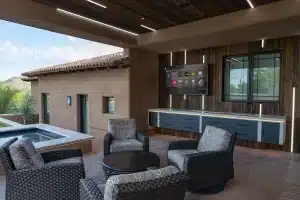

A wall touchscreen earns its place when everyone in the home knows where to find it and how to use it. The Control4 T5 gives homeowners a dedicated interface for everyday control, with a display that can become part of the room’s design.
For a kitchen, entrance or principal bedroom, the appeal is straightforward: a shared place to reach the home’s functions without first finding a phone. The right upgrade starts with how the household actually uses that location.
What the T5 brings to the wall
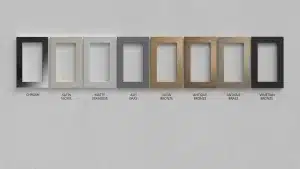
The T5 family includes 8-inch and 11-inch models, with the larger model using a 10.5-inch diagonal display. Both sizes provide 1920 × 1200 resolution. The range supports household control, camera viewing and intercom, with Midnight Black and White options.
The published specification lists Control4 X4.2 as the software requirement. Power can be supplied through suitable PoE infrastructure or the specified optional AC supply. Those requirements belong in the upgrade plan alongside screen size and finish.
Choose the location around a real task
Before choosing the larger screen, stand where you would normally use it. Can you reach the controls comfortably? Does a nearby window create glare? Would the person answering a doorbell call naturally be in this room?
Our design recommendation is to give each screen a clear purpose. A kitchen screen might prioritize shared music and doorbell calls. A bedroom screen might emphasize lighting and shades. These are proposed layouts to discuss during planning, rather than features that appear automatically after installation.
Upgrading an existing Control4 home
Replacing an older screen involves more than checking the wall opening. The assessment should cover the mounting hardware, cable condition, available power, network connection and compatibility of the retained system with the required software.
Bring a list of what works well today. Existing scenes, room names and familiar controls should form part of the installation test. A new display should make daily use easier while preserving the functions your household depends on.
Plan your T5 upgrade with Dana
Dana Smart Homes can review the existing installation and help choose the right interface for your rooms. Start with our detailed T5 upgrade guide, or contact us to discuss your home.
Product reference: Control4 T5 specifications from Snap One by ADI. Confirm the exact model and availability when requesting a proposal. Manufacturer marketing image.